> For the complete documentation index, see [llms.txt](https://payana-saas.gitbook.io/payana-saas-docs/llms.txt). Markdown versions of documentation pages are available by appending `.md` to page URLs; this page is available as [Markdown](https://payana-saas.gitbook.io/payana-saas-docs/dokumentasi-teknis/struktur-basis-data.md).
# Struktur Basis Data
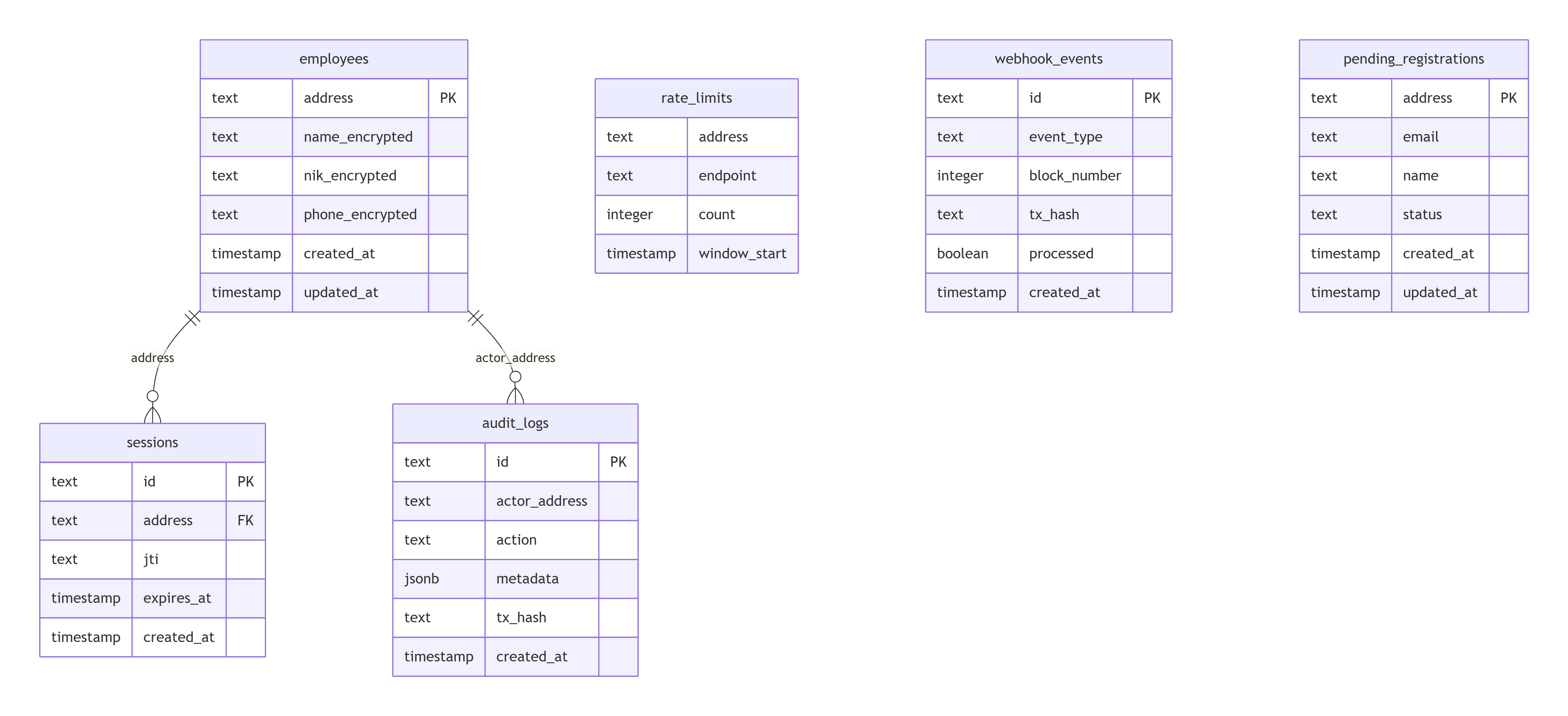
Payana memakai **satu instance PostgreSQL fisik**, dibagi menjadi dua skema logis dengan tanggung jawab berbeda — plus satu gambaran state on-chain sebagai referensi, karena struktur "sebenarnya" dari data payroll adalah struktur kontrak, bukan tabel database.
## Skema `app` — milik backend
Dikelola lewat migrasi Drizzle (`payana-backend/drizzle/`). Berisi semua yang off-chain: `employees`, `sessions`, `pending_registrations`, `employee_invitations`, `reimbursement_claims`, `bounties`, `bounty_claims`, `company_settings`, `tips`, `suspended_clients`, `compliance_reconciliations`, `salary_advances`, `phk_reasons`, `notifications`, `employee_profiles`, `employment_letters`, `anomaly_alerts`, `audit_logs`, `webhook_events`, `rate_limits`.
Skema app — data off-chain milik backend.
## Skema indexer — milik payana-indexer
Diisi otomatis oleh Ponder, dibaca (tidak pernah ditulis) oleh backend lewat query SQL langsung dengan `search_path` diarahkan ke sini. Detail tabel: [Skema Indexer](/payana-saas-docs/dokumentasi-teknis/skema-indexer.md).
## Referensi: state on-chain
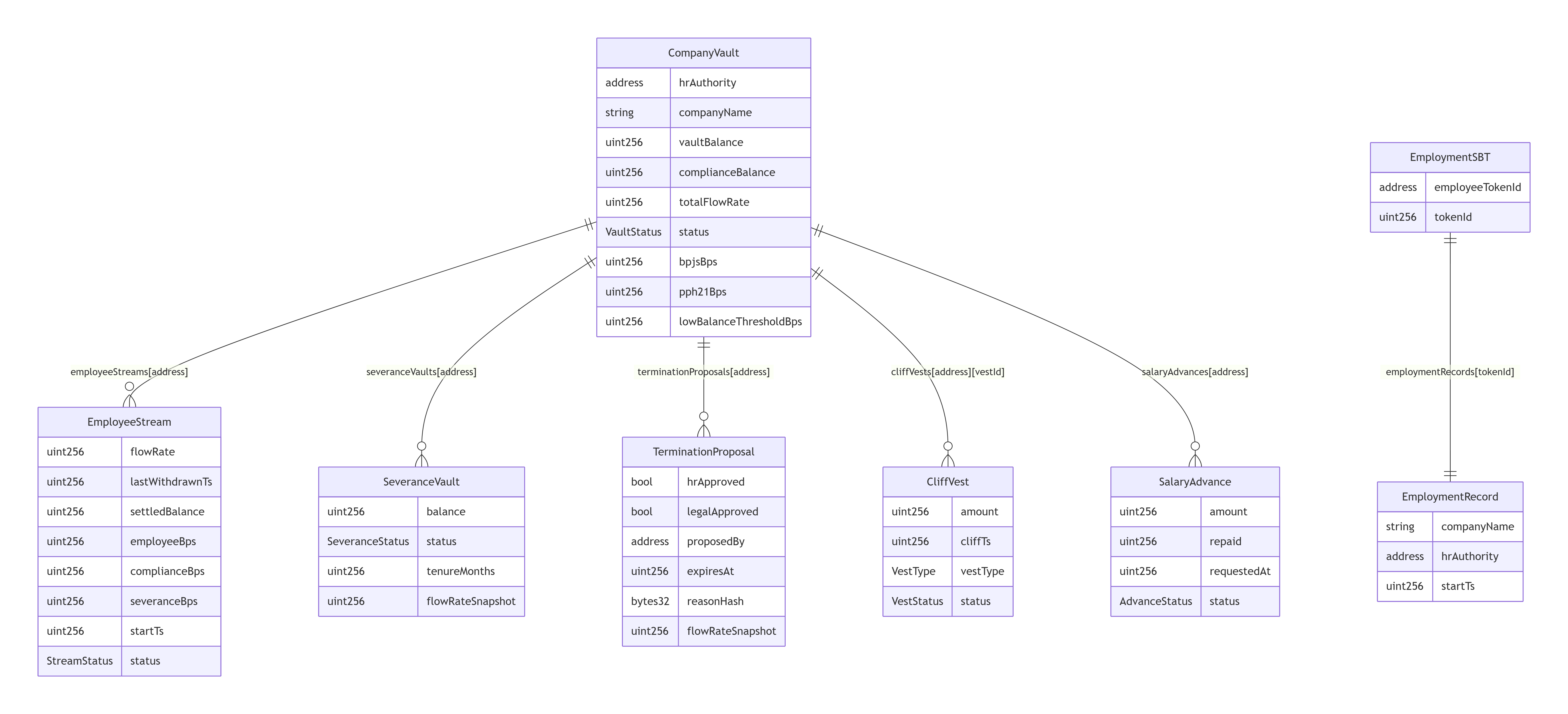
Kedua skema di atas pada akhirnya adalah cermin (mirror) dari apa yang sungguh-sungguh menjadi sumber kebenaran: state di dalam smart contract itu sendiri. Diagram berikut menggambarkan struktur data on-chain yang direfleksikan oleh skema indexer.
Struktur state on-chain — sumber kebenaran yang direfleksikan skema indexer.
## Kenapa dipisah, bukan satu skema besar
Memisahkan skema `app` dari skema indexer menjaga batas tanggung jawab tetap jelas di level database, bukan cuma di level kode aplikasi: migrasi Drizzle tidak pernah bisa (secara tidak sengaja) menimpa tabel yang dikelola Ponder, dan sebaliknya. Keduanya tetap bisa di-query bersamaan dalam satu koneksi (berguna untuk laporan gabungan seperti compliance) justru karena mereka berbagi database fisik yang sama — cuma beda `search_path`.
---
# Agent Instructions
This documentation is published with GitBook. GitBook is the documentation platform designed so that both humans and AI agents can read, navigate, and reason over technical content effectively. Learn more at gitbook.com.
## Querying This Documentation
If you need additional information that is not directly available in this page, you can query the documentation by asking a question.
Perform an HTTP GET request on the following URL with the `ask` and `goal` query parameters:
```
GET https://payana-saas.gitbook.io/payana-saas-docs/dokumentasi-teknis/struktur-basis-data.md?ask=&goal=
```
`ask` is the immediate question: it should be specific, self-contained, and written in natural language.
`goal` is what the user is ultimately trying to achieve, the reason they need the answer. Sharing it helps GitBook give you a better, more relevant answer. A goal is most helpful when it describes the outcome the user wants rather than restating the question. For example, with `ask=how do I create an API token`, a goal like `automate deployments from our CI pipeline` lets GitBook tailor the answer to that use case.
The response will contain a direct answer to the question and relevant excerpts and sources from the documentation.
Use this mechanism when the answer is not explicitly present in the current page, you need clarification or additional context, or you want to retrieve related documentation sections.