> For the complete documentation index, see [llms.txt](https://payana-saas.gitbook.io/payana-saas-docs/llms.txt). Markdown versions of documentation pages are available by appending `.md` to page URLs; this page is available as [Markdown](https://payana-saas.gitbook.io/payana-saas-docs/dokumentasi-teknis/skema-indexer.md).
# Skema Indexer
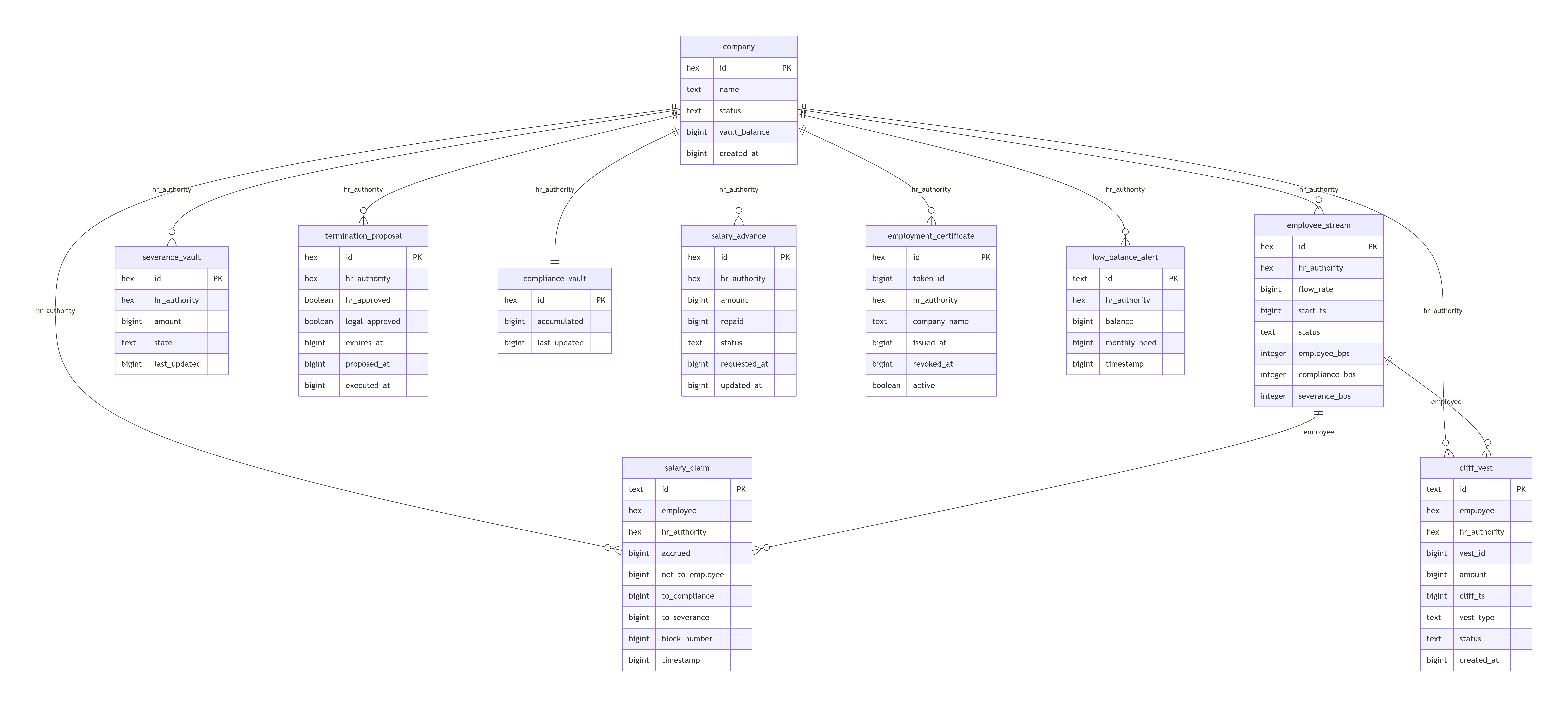
Tabel yang didefinisikan di `payana-indexer/ponder.schema.ts`, diisi otomatis dari event kontrak — lihat [Lapisan Indexer](/payana-saas-docs/arsitektur/indexer.md) untuk konteks.
| Tabel | Diisi dari event | Isi |
| ----------------------- | ------------------------------------------------------------------------------------------- | -------------------------------------------------- |
| `company` | `VaultDeployed` | Registry perusahaan: alamat HR, alamat vault, nama |
| `employeeStream` | `StreamCreated`, `StreamPaused`, `StreamResumed`, `FlowRateUpdated`, `StreamCancelled` | Status stream gaji tiap karyawan |
| `salaryClaim` | `SalaryClaimed` | Riwayat setiap klaim EWA |
| `salaryAdvance` | `AdvanceRequested`, `AdvanceApproved`, `AdvanceRejected`, `AdvanceRepaid` | Riwayat kasbon |
| `cliffVest` | `CliffVestCreated`, `CliffVestClaimed`, `CliffVestForfeited` | Bonus dengan jadwal vesting |
| `severanceVault` | `SeveranceReleased`, `SeveranceReturned`, `SeveranceShortfall` | Data pesangon |
| `terminationProposal` | `TerminationProposed`, `TerminationApproved`, `TerminationExecuted`, `TerminationCancelled` | Proposal & status PHK |
| `complianceVault` | `TaxWithheld`, `ComplianceWithdrawn` | Akumulasi potongan BPJS/PPh21 |
| `employmentCertificate` | `EmploymentCertified`, `EmploymentRevoked` | Data penerbitan/pencabutan SBT |
| `platformFeePayment` | `PlatformFeePaid` | Pembayaran fee ke treasury platform |
| `lowBalanceAlert` | `LowVaultBalance` | Riwayat alert saldo vault menipis |
| `vaultWithdrawal` | `VaultWithdrawn`, `VaultFunded` | Riwayat setor/tarik dana perusahaan |
| `roleChange` | (role grant/revoke `HR_ROLE`/`LEGAL_ROLE`) | Perubahan otorisasi |
## Alamat vault ditemukan otomatis
`ponder.config.ts` mengawasi event `VaultDeployed` dari `PayrollFactory` memakai `factory()` — bukan daftar alamat statis. Ini berarti setiap perusahaan baru yang mendaftar otomatis mulai terindeks tanpa perlu redeploy indexer.
## Diagram skema
Relasi antar tabel yang diindeks dari event blockchain.
---
# Agent Instructions
This documentation is published with GitBook. GitBook is the documentation platform designed so that both humans and AI agents can read, navigate, and reason over technical content effectively. Learn more at gitbook.com.
## Querying This Documentation
If you need additional information that is not directly available in this page, you can query the documentation by asking a question.
Perform an HTTP GET request on the following URL with the `ask` and `goal` query parameters:
```
GET https://payana-saas.gitbook.io/payana-saas-docs/dokumentasi-teknis/skema-indexer.md?ask=&goal=
```
`ask` is the immediate question: it should be specific, self-contained, and written in natural language.
`goal` is what the user is ultimately trying to achieve, the reason they need the answer. Sharing it helps GitBook give you a better, more relevant answer. A goal is most helpful when it describes the outcome the user wants rather than restating the question. For example, with `ask=how do I create an API token`, a goal like `automate deployments from our CI pipeline` lets GitBook tailor the answer to that use case.
The response will contain a direct answer to the question and relevant excerpts and sources from the documentation.
Use this mechanism when the answer is not explicitly present in the current page, you need clarification or additional context, or you want to retrieve related documentation sections.